
Subtitles vs Closed Captions: What's the Difference?
Subtitles translate dialogue; closed captions also describe sound. Learn the difference, tell which type a video has in 10 seconds, and why it matters when editing.
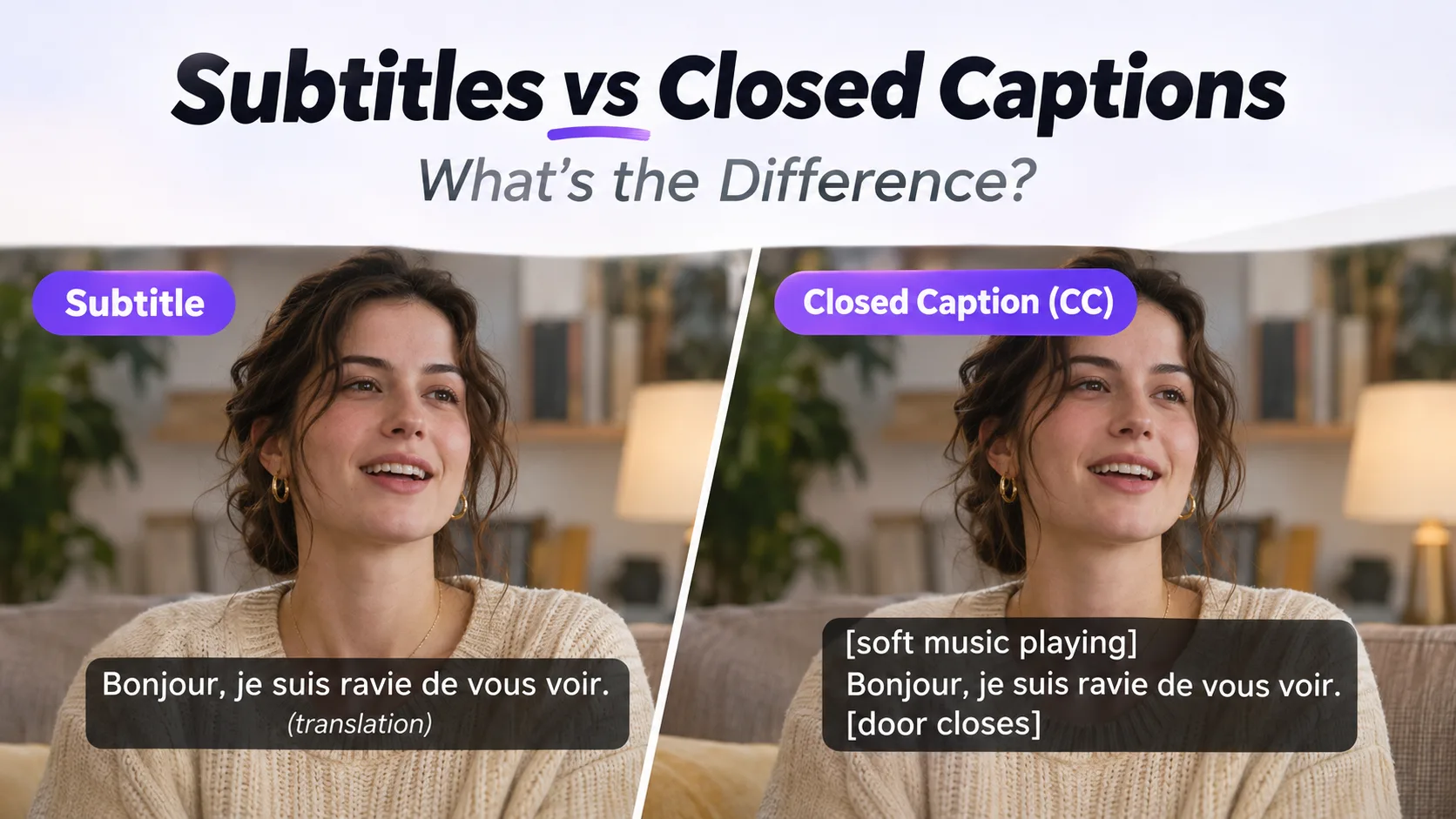
The short answer: subtitles translate what's being said, for viewers who can hear the audio but don't understand the language. Closed captions transcribe what's being said and describe the sounds a viewer can't hear, for viewers who can't hear anything at all. Subtitles assume the viewer can hear. Captions assume nothing.
That one sentence is the whole difference. Everything else follows from it: the button in the player, who the file is made for, whether you can switch to another language, and why one of them can't be turned off when you need it gone.
Side-by-side
| What it is | Can the viewer turn it off? | Who it's for | Where you meet it | |
|---|---|---|---|---|
| Subtitle | Translation of the dialogue, normally into one other language | Yes — it's a separate track | Hearing viewers who don't speak the original language | Netflix language menu, foreign films, anime, translated series |
| Closed caption (CC) | Transcript of dialogue plus descriptions of meaningful sounds and speaker labels | Yes — usually a CC button | Deaf and hard-of-hearing viewers; also anyone watching with the sound off | Broadcast TV, YouTube CC, Zoom, webinar recordings |
| Open caption (OC) | The same content as closed captions, but permanently visible in the frame | No | Cinema audiences, gyms and waiting rooms, players with no CC button | Cinema screenings, in-flight video, TVs in public spaces |
| Burned-in / hardcoded | Any text rendered into the video pixels — subtitles, captions, or both | No, not without editing the picture | Whoever the video was exported for | TikTok, Reels, Shorts, translated short dramas, screen recordings |
Subtitles are translation, not transcription
The word covers two quite different jobs, and mixing them up is where most of the confusion starts.
Interlingual subtitles go from one language into another. A Spanish drama with English subtitles, a Japanese film with French subtitles. The viewer hears the audio perfectly well, so the subtitle track says nothing about what the audio sounds like. It only carries dialogue — and only the dialogue worth reading. Filler ("um", "well, you know") is usually cut, and the text is condensed so it fits on screen for a second or two per line.
Intralingual subtitles stay in the same language: English subtitles on English audio. They show up for heavy accents, thick regional dialect, mumbled dialogue, or simply when the viewer has the sound low. Because they're in the same language as the audio, they are often mistaken for captions — and in practice this is where the two categories blur. A same-language track that also mentions [door slams] is functioning as closed captions.
So the user-facing distinction isn't really "subtitles = translation". It's "does this track tell you anything that isn't spoken dialogue?" If it doesn't, it's subtitles. If it does, it's captions.
Closed captions transcribe — and also describe
Closed captions carry everything subtitles carry, plus the parts of the soundtrack you can't see:
- Sound effects that matter: [door slams], [phone buzzing], [engine stalls]
- Music cues with intent: [tense orchestral music], [upbeat pop song], [♪♪] for background music with no lyrics worth transcribing
- Speaker identification: MAN:, NARRATOR:, or [whispering] ANA:, so you can follow who's talking when voices are hard to tell apart
- Off-screen dialogue and voice-over, which subtitles often drop
- Non-verbal vocalizations: laughter, sighs, a sharp inhale before bad news
That extra layer is the accessibility promise: a deaf viewer should get the same information a hearing viewer gets, not just the words. It's also why captions on broadcast television in the US are a legal requirement while subtitles are not — captions are the accommodation, subtitles are a convenience.
Two abbreviations you'll run into:
- CC — closed captions. "Closed" means hidden until the viewer turns them on.
- SDH — subtitles for the Deaf and Hard of Hearing. Same-language subtitles that include sound descriptions. Functionally these are closed captions, delivered as a subtitle file. If a streaming service offers "English SDH", that's captions wearing a subtitle label.
Open captions are the same content, different delivery
Open captions are closed captions you can't switch off. The text — including the sound descriptions — is visible to every viewer, always. The distinction isn't about content, it's about the delivery mechanism:
- Closed = optional, toggled by the viewer, delivered as a separate track
- Open = mandatory, part of the picture, the same for everyone
A cinema screening with burnt-in subtitles is showing open captions. A yoga video with permanent on-screen instructions is closer to open captions than to subtitles. The phrase "open captions vs closed captions" gets searched almost as often as "subtitles vs closed captions", and the answer really is this short — what changes is who controls visibility, not what the text says.
Burned-in subtitles are the case that causes all the confusion
Here's the thing people miss: "subtitle" and "caption" describe what the text contains. "Burned-in" describes where the text lives. They're independent axes.
You can burn subtitles into a video (translated dialogue, baked into the frames). You can burn captions into a video (transcript plus sound descriptions, baked into the frames). Either way, the pixels now contain the text, and that has consequences no player button can undo:
- You cannot turn it off
- You cannot switch languages
- It survives re-encoding, re-upload, and every screen recording of the file
- It gets cropped when the video gets cropped, and it stays the same size relative to the picture
- When you need it gone, you have to remove it from the picture itself, not from a track
That last point is where most people arrive at this topic in the first place — with a downloaded TikTok, a screen-recorded webinar, or a translated short drama that has the text welded into the frames. If that's your situation, the practical guide is how to remove hardcoded subtitles — how to erase burned-in text without blurring a box over it or cropping the frame.
How to tell which one you're looking at in about 10 seconds
This is the part the definition pages skip. Run these five checks in order:
- Hunt for a CC / subtitle button and toggle it. Text disappears → it's a track (subtitles or closed captions). No such control anywhere, or the control does nothing → keep going.
- Read one line for brackets. [door slams], (laughs), MAN: — anything describing sound rather than speech means closed captions. Pure dialogue with no sound labels means subtitles, even if it's the same language as the audio.
- Compare the text language to the audio language. Different → subtitles. Same language, and it includes sound descriptions → closed captions (or SDH).
- Crop or resize the video a little and watch the text. Text that gets clipped along with the frame, stays glued to the same spot, scales with the picture, or goes pixelated when you zoom in is burned in. A track always renders crisply at the player's own resolution, outside the video frame.
- Look at a thumbnail or a paused preview frame. Thumbnails are single images — they can only contain burned-in text. If you can see the words on the thumbnail, the words are in the pixels.
Check 5 is the fastest test of all and almost nobody mentions it. A screenshot of the player is a second opinion: burned-in text is trapped in the screenshot at video resolution, while a track is drawn by the player and can look sharper than the frame behind it.
Where you actually meet each one
YouTube. Uploaded .srt or .vtt files and YouTube's auto-generated captions are tracks — editable, hideable, translatable, and indexed by search. Plenty of creators also burn styled captions into the video, because burned-in text is the only kind that's guaranteed to appear on the muted autoplay feed. So the same video can carry both, and the burned-in copy is the one you can't get rid of from the player.
TikTok, Reels, Shorts. Almost everything you see on screen is burned in. These platforms may generate a caption track for accessibility, but the designed word-by-word text that creators add is pixels. Download the video and you inherit the text; there is no track to strip.
Courses, webinars, and internal recordings. This is closed-caption territory: transcripts, sound labels, and speaker names, usually for compliance or for people watching in open-plan offices. Often exported with hardcoded captions anyway, because the recording tool doesn't offer a track — which is how a properly captioned video ends up needing pixel-level repair.
Translated short dramas and overseas series. Hardcoded translated subtitles, one language per export, and the original-language audio under them. Rewriting them for a new market means removing them first — you can't just swap a language file.
Why the difference decides what you can do next
- Track (subtitles or closed captions): turn it off in the player, or delete the stream from the file. Free, lossless, and it takes seconds. Nothing in the picture changes.
- Burned in: you're editing an image now. Blurring a bar, cropping the frame, or dropping a solid box over the text are the old workarounds — they all destroy part of the shot, and they look like exactly what they are.
- Re-encoding won't help. Burned-in text isn't a stream sitting next to the video; it's part of the video. Copying the file, changing the container, or running it through a converter preserves it.
- Check before you publish. If your export tool has a "burn subtitles" or "hardcode captions" option, that single checkbox decides whether your accessibility text is removable later — for you and for anyone reusing the clip.
FAQ
Are subtitles and captions the same thing? No. Subtitles translate dialogue for viewers who can hear it. Closed captions transcribe dialogue and describe non-speech sounds for viewers who can't hear it. A quick test: brackets like [door slams] mean captions.
What does SDH mean? Subtitles for the Deaf and Hard of Hearing — same-language subtitles that include sound and speaker information. Despite the name, they work as closed captions.
What's the difference between open and closed captions? The content is identical. Closed captions are optional and toggled by the viewer; open captions are permanently visible in the frame. "Closed" refers to them being hidden until switched on.
Is burned-in the same as hardcoded? Yes — both mean the text is rendered into the video pixels. Some tools also say "open captions" for the same result. None of them can be turned off.
Can you remove subtitles or captions from a video that already has them burned in? If it's a track, delete the track and you're done. If it's burned into the frames, the text has to be erased from the picture — that's what a tool like ours does, and it's a completely different operation from switching a track off.
Have a video with text you can't switch off? Paste a link or upload the file and remove subtitles from video in the browser — no crop, no blur box, no watermark.